AI writing
Help with the words. Never with the facts.
The AI improves what you have written, or writes it from what your CV already says. You read every change before it is kept, and where it needs a fact you have not given, it leaves a gap for you to fill in.
Try it on my CVFree for now
What it can write
Wherever you write in the builder, an AI menu beside the words offers what fits them.
Your summary and headline
Improve your summary, or have it written from your CV when it is empty. For the headline under your name, choose from three suggestions.
Each job’s points
Improve a point, turn a duty into a result, make it shorter or longer, or ask for a change in your own words. A section’s entries can be improved together.
Your CV, aimed at a job
Paste a job advert, and the AI rewords your CV toward it from what the CV already says. One click puts back what was there, and the same advert is ready for your cover letter.
The whole CV at once
Improve the whole CV, or make it shorter: your summary and every entry’s paragraph and points, in one review. Or check the spelling and grammar of everything it shows.
Cover letters and other letters
A first draft from your CV, with the job advert for a cover letter. Then each paragraph improved, shortened or checked, or a whole cover letter aimed at a job.
An old CV, tidied as it comes in
What is read from an old CV can be tidied before it is brought in, an item at a time or all at once, each with Undo.
What the ATS check finds
Fix with AI on a finding asks for just the change it needs, such as a longer summary or a point with a result.
Your website’s introduction
A few lines for the top of your website, written from your CV as it shows, without your contact details.
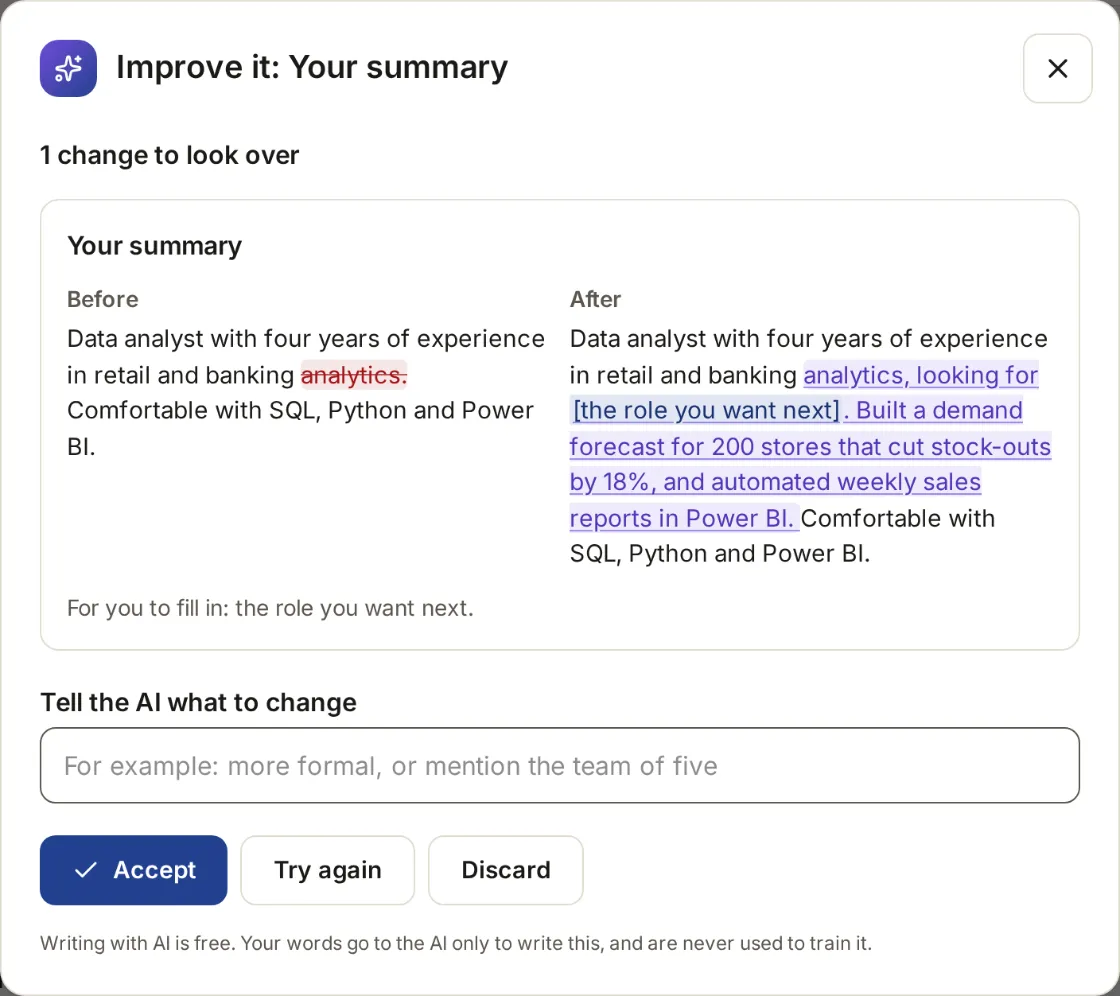
You decide what is kept
The AI never changes your CV by itself. Every answer comes to you as a review first.
Ask
Choose what you want from the AI menu beside a field, a section or the whole CV.
See each change
Each change is shown beside what was there, with what was taken out and what was added marked, and any gap named.
Accept or discard
Accept it, or tell the AI what to change and try again. Discard it, and nothing changes.
Undo
What you accept is saved like any other edit, and Undo puts back what was there.
What it will not do
The AI can still get things wrong. Read each change before you accept it.
Make things up
It writes only from your CV, what you asked for and the job advert you gave it. It does not add jobs, skills, figures or dates you have not given.
Guess a fact
Where a sentence needs a fact you have not given, it leaves a gap in square brackets, such as [how many stores], and the review names it for you to fill in. A figure your CV does not hold is made a gap before you see it.
Change anything on its own
Nothing in your CV or letters changes until you accept it.
Keep or learn from your details
The AI runs on our own computers. What you send it is not kept after it answers, and is never used to train it.
What it costs
Writing with AI is free for now. Later it joins a paid plan, planned from ₹199 a month, with a few free tries first. See the planned prices